I built a desk-top voice assistant called Pi-Esp Jarvis: say “Jarvis” to a little ESP32 screen, and a Raspberry Pi 5 answers, with Claude stepping in for the hard questions. It sets timers, wakes you up, reads the weather, keeps your shopping list and plays music. You can build one in an afternoon without writing any code.
What it does
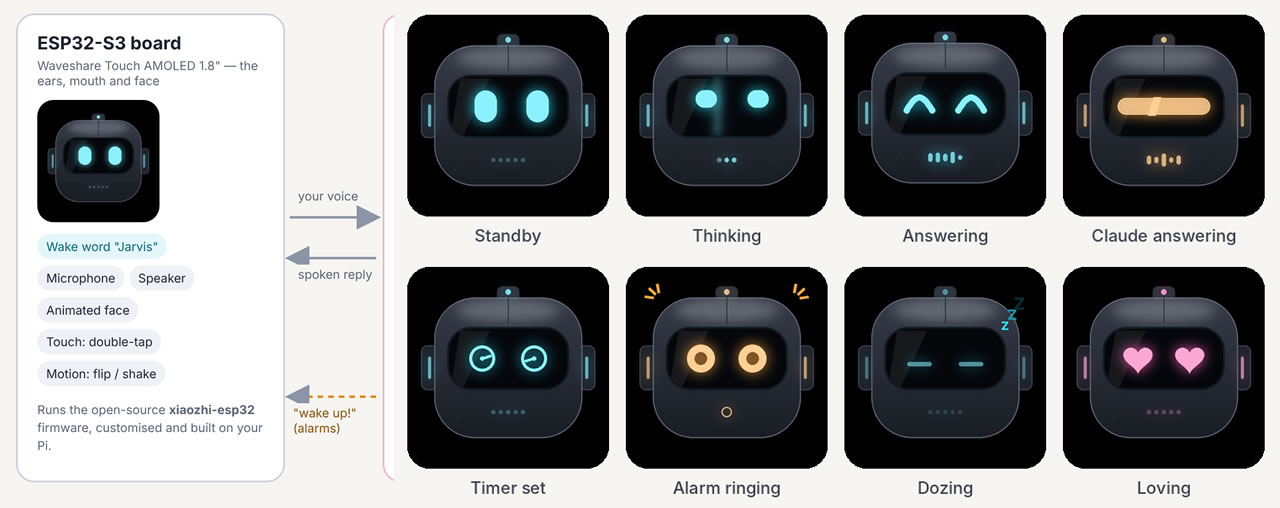
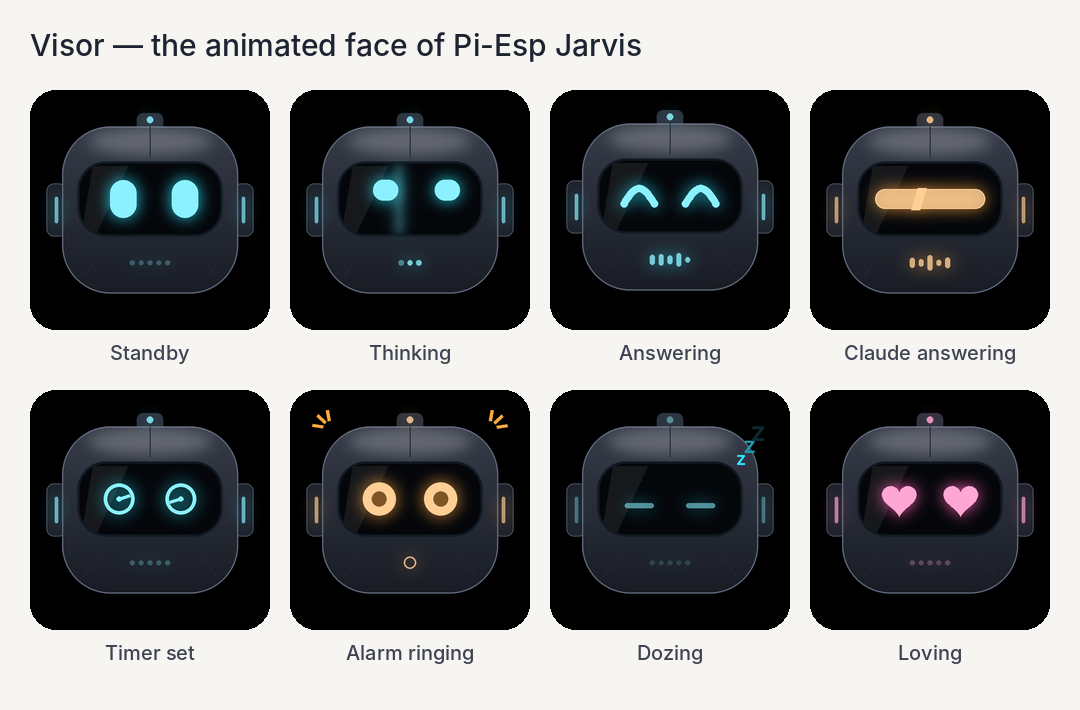
Jarvis is a smart speaker you own completely: a small board listens and talks, and your Raspberry Pi does the thinking. An animated robot face called Visor shows what it’s doing.
- Answers questions privately. Everyday chat is handled by an AI model running on the Pi itself, so it never leaves your house.
- Calls in Claude for the hard ones. Say “Use Claude, …” and the question goes to Claude. Ask something live, like last night’s score, and Claude searches the web.
- Timers, alarms and reminders. “Set a pasta timer for 9 minutes” or “wake me up at 7 every weekday”. When one is due, the board wakes up by itself and rings.
- Weather, news and a morning briefing. Say “good morning” and hear the date, the forecast, your reminders and three headlines.
- Lists and memory. “Add milk to the shopping list” or “remember the spare key is under the blue pot”. There’s a page for your phone too.
- Music. Your own files, or internet radio by genre or station name.
- Pi control. “How’s the Pi doing?”, “open YouTube”, “reboot the Pi” (it asks first).
- Gestures. Double-tap the screen to talk, turn it face-down to snooze, shake it to stop.
- Dice and countdowns. “Roll two dice” tumbles them on the screen (shake it to roll again), and every timer shows a live countdown ring. Stand it upside down and the screen turns round.
- Eyes (optional). Add a USB webcam and Jarvis can describe what it sees, show you a photo on its screen, or give you a live view.
- Voice notes. “Go into voice notes” turns the screen into a recorder with record, pause, stop and play buttons. Every note is saved on the Pi with a written transcript.
- Your own files, privately. Drop documents, pictures and recordings into a folder on the Pi and ask about them. Only the AI on the Pi reads them, never Claude.
- Easy Wi-Fi changes. Type a new network into a page on the Pi from any computer, instead of on a tiny phone keyboard, and Jarvis picks it up.
How it works
The trick is splitting the job in two: a cheap board does the listening and talking, and the Pi does the heavy thinking. The board can’t run an AI model (it has less than 1% of the Pi’s memory), but it’s brilliant at hearing a wake word and playing sound.
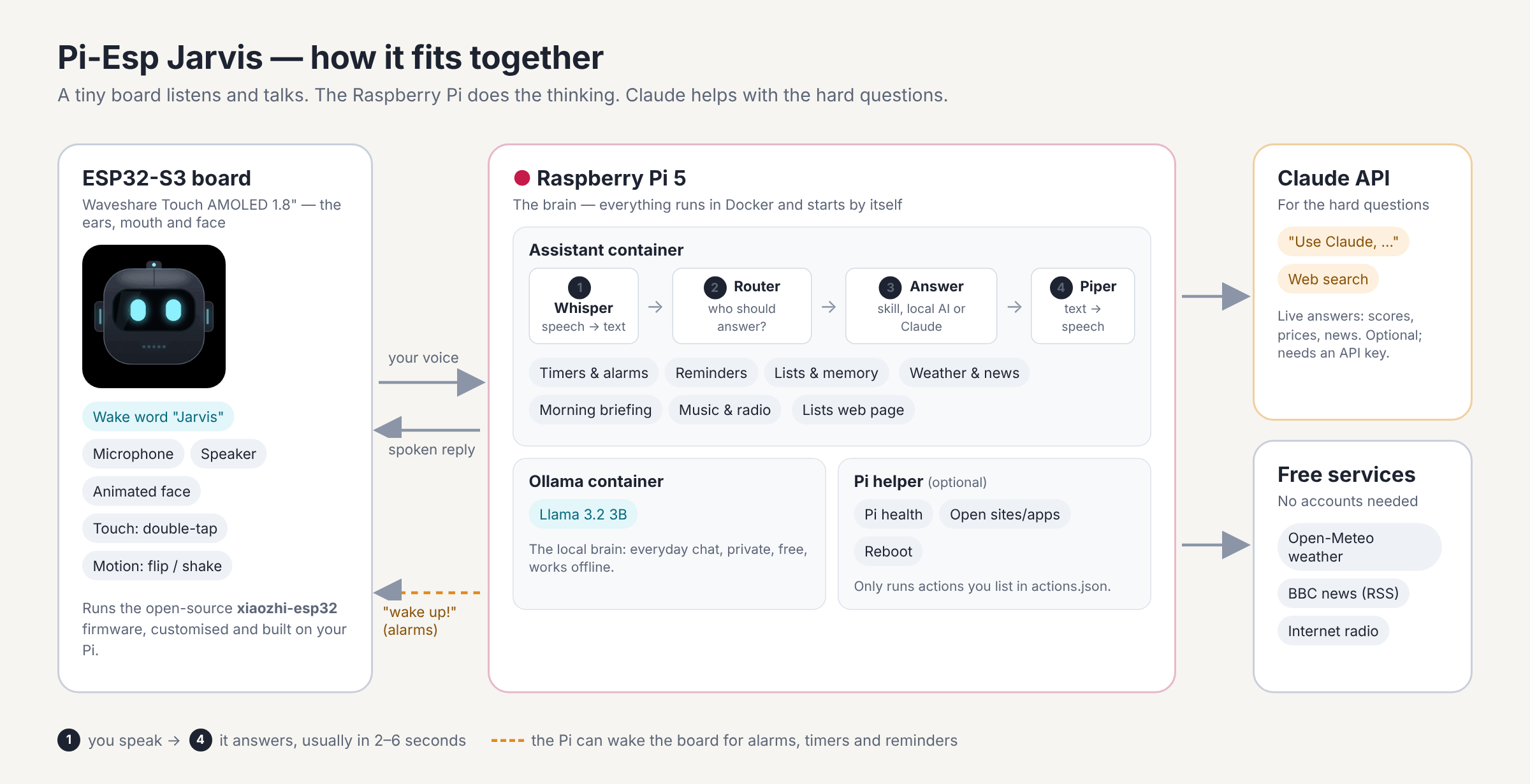
- You say “Jarvis”. The ESP32 board hears the wake word on its own chip, then streams your voice to the Pi over Wi-Fi.
- Whisper turns your speech into text. It’s an open-source speech recogniser running on the Pi.
- A router decides who answers. Timers, lists, weather, music and Pi control are handled by simple built-in skills (instant, no AI needed). Everyday chat goes to Llama 3.2, a small AI model running on the Pi. “Use Claude” questions, and anything that needs the internet, go to Claude.
- Piper turns the answer into speech and streams it back. The board plays it while Visor changes expression.
A typical answer starts within 2 – 6 seconds. Everything on the Pi runs in two Docker containers that restart by themselves after a power cut.
The board runs xiaozhi-esp32, a popular open-source voice-assistant firmware that already supports this exact board. Normally it talks to the vendor’s cloud servers; this project points it at your Pi instead. It also adds the Visor face, double-tap, motion gestures and a way for the Pi to wake the board when an alarm goes off.
What you’ll need
One Raspberry Pi, one ESP32 board and a cable. A Claude account is optional.
| Part | Why | Notes |
|---|---|---|
| Raspberry Pi 5 (8 GB) | Runs the AI, speech and skills | 4 GB works too; the setup picks a smaller AI model |
| microSD card (32 GB+) or SSD | Holds the system and AI models | An SSD loads models faster |
| Official Pi 5 power supply (27 W) | Steady power under load | Weak supplies make the Pi slow itself down |
| Waveshare ESP32-S3-Touch-AMOLED-1.8 | Microphone, speaker, screen, touch and motion sensor in one | Revision 1 or 2 both work |
| USB-C data cable | Flashing the board from the Pi | Some cables only charge; you need a data one |
| USB webcam (optional) | “What do you see?”, photos and a live view on the screen | A pan/tilt one, like the Logitech QuickCam Orbit, can also turn on command |
| Claude API key (optional) | “Use Claude” and live web answers | From console.anthropic.com, pay as you go |
You don’t need to solder anything or write code. Budget about an hour, most of it waiting for downloads and the firmware build.
Build it in five steps
Two scripts do almost all the work: one sets up the Pi, the other builds and flashes the board.
1. Prepare the Pi
Install Raspberry Pi OS (64-bit) with Raspberry Pi Imager. In the Imager’s settings, give the Pi a name (I used jarvis), turn on SSH and enter your Wi-Fi details. Boot it and open a terminal, either on the Pi or from your computer with ssh you@jarvis.local.
2. Install Pi-Esp Jarvis
git clone https://github.com/nativebreed/pi-esp-jarvis.git
cd pi-esp-jarvis
bash setup.sh
The script installs Docker if you don’t have it, then asks three optional questions: your Claude API key, your town (for the weather) and your units. Then it builds and starts everything. When it asks whether Jarvis may control the Pi, say y to get the Pi health and reboot commands.
The first start downloads about 2 GB of AI models in the background. Run docker compose logs -f assistant to watch, and wait for “Local model … ready”.
3. Flash the ESP32 board
Plug the board into the Pi with the USB-C data cable and run:
bash flash-esp32.sh        # board revision 1
bash flash-esp32.sh v2     # board revision 2
The first run builds the firmware on your Pi using Espressif’s official tools in Docker. It takes 20 – 30 minutes, so it’s a good time for a cup of tea. Later runs take a minute. Not sure which revision you have? Look for “V2” on the board or box; if the screen stays black after flashing v1, run it again with v2.
4. Connect the board to Wi-Fi
The board starts its own Wi-Fi network called Xiaozhi-XXXX. Join it from your phone, and a setup page opens (if it doesn’t, browse to http://192.168.4.1). Pick your 2.4 GHz Wi-Fi and type its password. The board restarts and Visor appears on a black screen.
5. Say “Jarvis”
Try “Jarvis, what’s the weather tomorrow?” You’ll hear a chime, Visor’s eyes light up, and a few seconds later it answers. You can also double-tap the screen instead of saying the wake word.
Things to try
Say “Jarvis” (or double-tap the screen) before each of these.
| Say | What happens |
|---|---|
| “What’s the weather tomorrow?” | A spoken forecast for your town |
| “Use Claude, explain black holes simply” | Claude answers; Visor’s eyes become an amber bar |
| “Who won the football last night?” | Claude searches the web for a live answer |
| “Set a pasta timer for 9 minutes” | The board rings when it’s done, even if it’s gone to sleep |
| “Boil an egg” | A 6-minute egg timer with a countdown ring on the screen |
| “Wake me up at 7 every weekday” | A repeating alarm; stopping it with “stop” plays your morning briefing |
| “Remind me in 20 minutes to check the oven” | A reminder that wakes the board |
| “Add eggs and bread to the shopping list” | Saved; check it on your phone at http://jarvis.local:8000/lists |
| “Remember the spare key is under the blue pot” | Later, “where’s the spare key?” just works |
| “Play some soul music” | Your own music, or a soul radio station |
| “Good morning” (watch video demo) | Date, weather, today’s reminders and the headlines |
| “How’s the Pi doing?” | Temperature, memory, disk and whether everything is running |
| “Roll two dice” | Neon dice tumble on the screen; shake the board to roll again |
| “Flip the screen” | Turns the screen round if Visor is ever upside down |
| “Take a picture” | The webcam photo appears on the board’s screen |
| “Show me the camera” | A live view on the board’s screen; double-tap or say “stop” to close it |
| “Take a note” | Opens the recorder and starts recording; tap stop when you’re done |
| “Read my last note” | Reads out what you said, from the transcript |
| “Check my files for the boiler warranty” | Searches your private library and answers on the Pi, naming the file it found |
| “Change Wi-Fi” | Saves a network you typed on the Pi’s Wi-Fi page, or walks you through Wi-Fi setup |
To silence a ringing alarm, double-tap and say “stop” or “snooze”, turn the board face-down to snooze it, or give it a shake to stop it.
Give Jarvis eyes
Plug a USB webcam into the Pi and Jarvis can see: ask “what do you see?” and Claude describes the photo. I used an old Logitech QuickCam Orbit AF, a round webcam with a motor inside, so my Jarvis can turn its head too.
- Ask about what it sees. “What do you see?”, “What am I holding?” or “Is anyone in the room?” Jarvis takes a photo, shows it on its screen, and Claude answers.
- Photos and live view. “Take a picture” puts the photo on the board’s screen. “Show me the camera” gives a live view, a smooth slideshow of several pictures a second, with a red LIVE tag in the corner. “Look left” works while you watch.
- Turn the camera. “Look left”, “look up a bit” or “look left and tell me what you see”. This needs a pan/tilt webcam; any other webcam still does photos.
- Look around. Three photos from left to right, described as one room.
- Saved spots. “Remember this as the door”, then later “look at the door”.
To switch it on, plug the camera in and run bash setup.sh again: it spots the webcam and asks whether Jarvis may use it. Describing pictures needs a Claude API key, and Jarvis only takes a photo when you ask. Photos and the live view travel from the Pi to the board over your own Wi-Fi, never the internet, and each one uses a secret link so nothing else on your network can open the camera.
Voice notes
Say “Jarvis, go into voice notes” and the board becomes a little recorder: four buttons along the bottom (record, pause, stop, play), a level meter that moves as you speak, and a timer. It turns red while recording and cyan while playing. Swipe for older notes, and tap the X to go back to Visor.
- Record. Tap record, or just say “take a note”. Pause leaves a gap you can carry on after, and stop saves it. If you forget, Jarvis stops by itself after a stretch of quiet.
- Listen back. Tap play, or say “play my last note” or “read my last note” to hear the transcript instead.
- Written down for you. A few seconds after you stop, Whisper on the Pi writes out what you said. Optionally, Claude tidies the transcript (punctuation, paragraphs, no “um”s) and gives each note a title.
- On your phone too. Open
http://jarvis.local:8000/notes, next to your lists, to play notes in the browser, search what you said, download them or delete them.
Each note is a pair of ordinary files in a voice-notes folder on the Pi, named by when you recorded it: 20261028143205.ogg for the audio and 20261028143205.txt for the words.
Your private library
This is the feature I wanted most: let Jarvis answer from my own papers without any of them going to the cloud. There’s a library folder on the Pi. Drag documents, pictures and recordings onto the Library page from any phone or computer, or copy them into that folder, and a minute later Jarvis can answer questions about them.
- Just ask. “When does my car insurance renew?” If your files clearly have the answer, Jarvis uses them and tells you which file it came from. “Check my files for…” makes it search harder, and if nothing fits it says so rather than guessing.
- Reads almost anything. Word, Excel, PowerPoint, PDFs (scans too), text, Markdown, CSV, JSON and web pages. Pictures get their writing read and a one-line description, recordings are transcribed, and your voice notes are included.
- Databases too. On the Library page you can connect a SQLite, MySQL, PostgreSQL or JSON database and save questions like “how many orders today?”. Jarvis only ever reads, never changes anything.
- See what it knows.
http://jarvis.local:8000/librarylists every file and whether it was read, lets you add, open and delete files (Jarvis forgets a deleted file straight away), and lets you try a search to see exactly which passages Jarvis would use.
It works by search rather than training. Retraining the AI on a Pi would take days and still get details wrong. Instead, each file is cut into short passages and indexed by a small search model on the Pi. Your question finds the closest passages, and the local AI answers from just those. Answers take a little longer than chat, around 10 to 20 seconds, and it’s best at “what does this file say about…” rather than adding up a year of invoices.
None of it goes to Claude. Library passages, database answers and anything you’ve asked Jarvis to remember are only ever given to the AI on the Pi. Even “use Claude, when does my insurance renew?” is answered on the Pi, and Jarvis says so. The code that talks to Claude also strips anything marked private before it sends a single word, and logs every call so you can check.
Taking Jarvis somewhere new
Typing a Wi-Fi password on a phone’s setup page is fiddly, so the Pi has a page for it. Before you move Jarvis, open http://jarvis.local:8000/wifi on any computer, type the network name and password, and press Save for Jarvis. Next time you talk to Jarvis it saves the network next to its current one, and at the new place it connects by itself. The password is kept on the Pi only until Jarvis has it. Already moved? The board opens its setup hotspot on its own, and you can join it from a laptop instead of a phone.
How I built it with Claude Code
I didn’t write this code myself: I built the whole thing in one long conversation with Claude Code, in an afternoon. I described what I wanted, Claude wrote and tested the code, and I ran the commands on my Pi and reported back what happened.
The build went roughly like this:
- The question. I started by asking whether an ESP32 could be an AI assistant on its own. Claude explained that it can’t run a language model, but makes a great “ears and mouth” for a Raspberry Pi. That became the design.
- Finding the firmware. Instead of writing firmware from scratch, Claude found an open-source project that already supported my exact board, and wrote a small patch to point it at my Pi.
- The Pi server. Claude wrote the Python server that speaks the board’s protocol, plus the speech, routing and Docker setup. It tested everything against a simulated board before I touched any hardware.
- The first real test. I flashed the board, said “Jarvis”, and it worked. Then I asked it to play soul music. It said it was playing, then apologised that it couldn’t. The local model had made it up! Claude added a proper music player and told the local model never to pretend.
- Making it mine. One-line requests became features: “use Claude” as the trigger phrase, double-tap to wake, then timers, alarms, weather, lists, a morning briefing, Pi control and gestures in a single batch.
- The face. I asked for a big animated character. Claude designed Visor, an original robot helmet, and showed me a to-scale preview on the real screen size, with two size options, before writing any code.
- The upside-down bug. Later I added dice, egg timers and a screen that turns itself upright. My screen came up upside down: the board had learned “up” while hanging from its cable. Claude added “Jarvis, flip the screen”, and the line it printed in the log became the built-in default, so nobody else has to fix it.
- The camera on the screen. Getting photos and live view onto the board took three real-world fixes. First the board got stuck in a restart loop: two chips had wedged, and with the battery attached, unplugging USB wasn’t a full reset. Claude made the firmware retry stuck chips at startup instead of looping. Then photos arrived but wouldn’t display: the board’s log showed its picture decoder rejecting them, because their height (276 pixels) wasn’t a multiple of 8. And the live view got zero pictures, because I’d asked my webcam for raw video; switching to its built-in compressed mode fixed it.
A few things I learned that will help if you try this yourself:
- Describe the outcome, not the code. “I want it to wake me up at 7” worked better than naming technologies.
- Ask for a preview before big changes. Seeing the face at real size saved a round of rework.
- Report real-world results. The most useful messages were the simple ones, like “it said it was playing but it wasn’t”.
- Ask what it couldn’t test. Claude was upfront about what it had checked against a simulator and what only real hardware could prove.
- Send logs, not descriptions. When something broke, a 40-second log from the board and the Pi pointed straight at the cause. Each camera problem took one log to find.
Costs, privacy and limits
Running Jarvis costs nothing beyond electricity, unless you use Claude.
- Claude is pay-as-you-go. A short spoken answer usually costs around a cent or less, and web searches add about $10 per 1,000. You can set a monthly spending limit in the Claude Console. Without an API key, everything stays local and free.
- What stays at home. Wake-word detection happens on the board. Speech recognition, the local AI, your lists, memories and alarms all live on your Pi, and so do camera photos, the live view, your voice notes and your private library.
- What leaves the house. Only “use Claude” questions, live web questions and “what do you see?” photos (sent to Anthropic), plus, only if you switch it on, voice-note transcripts for the Claude tidy-up (the text, never the recording), and weather, news and radio lookups (from free public services).
- The local AI is small. Llama 3.2 3B is fine for chat and quick facts, but it can be wrong, and it’s slower than the cloud. That’s exactly why Claude is one phrase away.
- It’s English-first. The speech models and phrases are set up for English.
- Keep it plugged in for alarms. On battery, the board switches itself off after 5 minutes idle and can’t ring until you turn it back on.
Make it your own
Most changes are one line in the .env settings file, then docker compose up -d.
| To change | How |
|---|---|
| The voice | Set PIPER_VOICE, e.g. en_GB-alan-medium (pick from the Piper voices) |
| Speaking speed | SPEECH_SPEED=1.2 for 20% faster |
| The local AI | LOCAL_MODEL=llama3.2:1b for speed, or any other Ollama model |
| Claude model | CLAUDE_MODEL=claude-haiku-5-5 for faster, cheaper answers |
| Your news | NEWS_FEEDS = any RSS feed addresses, comma-separated |
| The wake word | Reflash with WAKE_WORD=hiesp bash flash-esp32.sh to say “Hi ESP” |
| The face | Swap the GIFs in firmware/face/emoji/ (one per mood) and reflash |
| What it can do on the Pi | Add apps, websites or your own scripts to pi-helper/actions.json |
And if you have Claude Code yourself, you can keep going the way I did: open the project folder and describe the next feature you want.
If something goes wrong
Most problems come down to the board not finding the Pi, or a cable that only charges.
| Problem | Fix |
|---|---|
| The screen says it can’t connect to the server | Your network can’t find the Pi by name. Reflash with the Pi’s IP address: OTA_URL=http://$(hostname -I | cut -d' ' -f1):8000/xiaozhi/ota/ bash flash-esp32.sh |
| “No ESP32 found” when flashing | Use a data cable. Still nothing? Unplug the board, hold BOOT while plugging it back in, and retry |
| “Permission denied” from Docker | Log out and back in (or reboot) after the first setup |
| It hears you but never answers | Run docker compose logs -f assistant to see what it heard and who answered |
| “Jarvis” rarely triggers | Speak from about 1 m away, or switch to “Hi ESP” (see above) |
| Alarms don’t ring | Keep the board on USB power and on Wi-Fi |
| The screen flashes black and white after flashing | A chip is stuck. Unplug the battery as well as USB, wait 10 seconds, and plug in USB only |
| “I couldn’t start the camera” | Check the webcam works on the Pi, and that no other program is using it; only one can at a time |
The README has more.
Get the code
Everything is free and open source on GitHub: github.com/nativebreed/pi-esp-jarvis. The README there has the full command list, every setting, and the parts list again.
If you build one, I’d love to see it. Share a photo, open an issue if you get stuck, or send a pull request with your own improvements.
Pi-Esp Jarvis is MIT-licensed and builds on some brilliant open-source work: xiaozhi-esp32 (the board firmware), Ollama with Meta’s Llama 3.2, faster-whisper, Piper, Open-Meteo weather data and the radio-browser.info station directory. The “use Claude” answers come from Claude by Anthropic. It’s a hobby project, not affiliated with Anthropic, Raspberry Pi, Espressif or Waveshare.
First dropped: | Last modified: October 30, 2026